At a Glance
- Input: a sim storyboard. Output: a playable, structurally complete Unity scene the design team can review in headset.
- Chapter 1 (2025 to early 2026): an n8n workflow and Gemini write a plain-text Sim DSL, and a deterministic Unity parser builds the scene from it.
- Chapter 2 (October 2026): Claude skills build the sim directly in Unity through the Transfr SDK's MCP tools, then play-test it themselves.
- Measured so far: designers in headset 2 days after the storyboard, ~7 days of setup saved, ~$0.08 per run.
The Bottleneck: Waiting to Feel the Sim
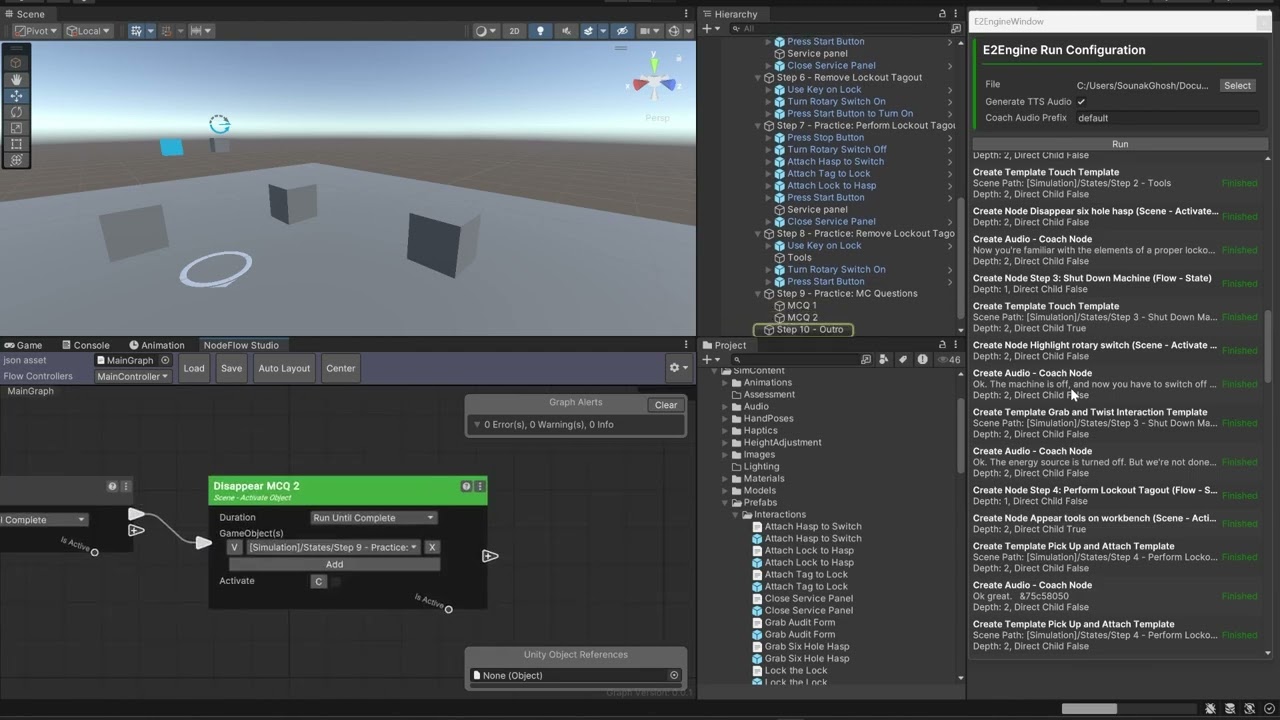
In XR, a storyboard can't tell you whether an interaction works — you only find out in the headset. At Transfr, getting there meant weeks of repetitive setup: building the step hierarchy, wiring Node Flow graphs, placing templates and hooking up coach voice-over. By the time designers could play a sim, changes were expensive.
I set the goal as a question of speed to judgment: how fast can we go from a storyboard to something the team can stand inside and critique?
How It Evolved
E2Engine grew on real production sims, with each one exposing the next gap.
- June 2025 · v1: the first E2Engine workflow ships as a Transfr SDK package.
- July 2025 · Lockout Tagout sim: I build the n8n workflow that converts this legacy storyboard — a sim that had taken ~6 weeks in production — into the Sim DSL, proving the format end to end.
- September 2025 · Flagger sim: the initial set-up shows which parser features are missing and measures the delta between the agent's output and a fully playable sim. The ~4 days saved go into prototyping the hand-signal interactions.
- January 2026 · v2: improved Unity tooling and system prompt, based on what we learned.
- April 2026 · Fiber Optics Training sim: the first sim built with v2 — ~7 days saved, designers in headset 2 days after the storyboard.
- October 2026 · v3: the pipeline moves to Claude skills, unity-cli and the Transfr SDK's MCP tools. The agent now builds and play-tests the sim inside Unity.
Chapter 1 — Decision 1: Separate the Generative Step From the Deterministic One
Rather than asking an AI to build a Unity scene directly, the first generation split the pipeline in two. An n8n agentic workflow converted the storyboard into a plain-text Sim DSL; a Unity tool then parsed that file and built the scene with the SDK. With the tools available in 2025, this was the right call:
- Inspectable: the DSL is human-readable, so a designer can review or hand-edit the LLM's output before anything touches Unity.
- Debuggable: when a run fails, we can tell whether the model generated the wrong thing or the parser couldn't read it.
- Reliable: everything that touches the scene is deterministic code, so the same file always produces the same result.
Decision 2: A Language Designed for an LLM to Write
The Sim DSL was pseudo-code shaped around how our sims are actually built — and around what a language model can produce consistently.
- Indentation expresses hierarchy: child nodes sit under their parents.
- A "+" chains a node after the previous one, so sequence is explicit.
- Curly brackets carry hierarchy paths to GameObjects and the input variables for each node.
- Template types and coach audio IDs are declared inline, so interactions and voice-over are created together.
The 11-Page Context Prompt
The DSL only worked if the model followed its rules exactly. I wrote an 11-page context prompt that taught it how to initialize each playspace (player position, coach location, preferences UI), build node chains, reference GameObjects by path, switch between coach and NPC voice-over, apply templates from our library, and lay out graphs for branching and any-order interactions. Different sim types got different context prompts.
Decision 3: Design Hallucination Out
An LLM inventing a template name that doesn't exist will break a build. Instead of hoping the model got it right, we constrained what it could say:
- Templates referenced in exactly three ways — an Asset Manager asset, a packaged SDK template, or a local prefab — always by exact name.
- Conditional paths written as IF statements, giving branching a predictable structure.
- The same guidelines baked into ScreenplAi, our storyboard-writing assistant, so storyboards arrived in a format the pipeline expected.
- On the Unity side, unrecognized nodes became empty Flow Nodes instead of crashing the run.
Testing Like a Product
I tracked every run ID and sorted each failure into one of two buckets: parse errors (the Unity tool couldn't read valid intent) and generative deltas (the model produced something different from the storyboard). That split told us whether a fix belonged in the parser, the prompt or the storyboard guidelines — and turned anecdotal bugs into a prioritized backlog.
The Fiber Optics Training review showed where the v2 pipeline still fell short, and set the next backlog:
- Play spaces needed a better-organized structure when generated.
- Conditional interactions for decision-making had no defined structure yet.
- Assessment nodes weren't supported.
- Custom tools weren't well integrated.
Chapter 2 — Decision 4: Let the Agent Build, and Test, Inside Unity
Chapter 1 proved the value, and its own maintenance list showed the cost: the context prompt, the DSL and the parser all had to stay in lockstep with a changing SDK, and failures only surfaced after the file was handed off. Once agents could operate the editor directly, the intermediate language became a layer to maintain rather than a safeguard. I led the migration to Claude skills.
- Builds in Unity: a storyboard-to-E2E skill reads the storyboard and builds the sim through the Transfr SDK's tool actions over unity-cli and MCP — step spine, coach and NPC voice-over, object visibility, the named interaction templates and Asset Manager props, persistent tools and branches. No DSL, no parser.
- Grounded in shared documentation: instead of one system prompt, the agent works from the team's Sim Dev authoring docs, and checks the live tool catalogs for node, template and socket names on every run.
- Tests its own work: it lints the graph, generates a drive script and plays the sim through its happy path with the InteractionSimulator — fixing and rerunning until the playthrough completes.
- Small by design: the skill deliberately builds a structural v1 and records everything else (mechanics, animation, SFX) as deferred for the team. A small, correct draft is faster to build on than a large one that's wrong in a hundred places.
- Asks only what it can't decide: a speaker with no voice configuration, an ambiguous step spine, or an asset the storyboard doesn't name.
Results So Far
Measured on production sims, separate from the projections above:
- Flagger sim (v1): ~4 days saved, ~$0.08 per run (14,186 input / 8,656 output tokens). The time went into prototyping the hand-signal interaction.
- Fiber Optics Training sim (v2): ~7 days saved, ~$0.08 per run, and the design team was in headset 2 days after the storyboard. Instructional designers could make changes early, avoiding later change requests with vendors.
- v3 (Claude skills, October 2026): newly in use. Its numbers will be added here once measured on production sims.
A Broader Foundation
Because the agent works with the same tools and documentation a developer would, the foundation reaches past first drafts. I extended the E2E skill to scored choices and assessment templates — closing two of the gaps the Fiber Optics review had flagged — and the same tool layer now supports QA bug fixing and unattended, headless test runs.
What Changed for the Team
- Design reviews moved into the headset: red flags became obvious and decisions were made faster than on a storyboard.
- Instructional designers could make changes early, avoiding late change requests with vendors.
- Production velocity rose once the team could see the sim in VR, freeing time for new and more important features.
- Vendors shifted from early-stage creation to high-fidelity polish.
The System Around It: Scriptr
E2Engine is the final stage of Scriptr, a three-part AI production system I designed for Transfr's sim pipeline.
- ScreenplAi: a Gemini Gem with a curated knowledge base that turns O*NET career data into simulation concepts and formatted VR scripts. In a 'Food Scientist' pilot it cut the time to a final script from 5 days to 75 minutes.
- Asset Bot: an n8n workflow that uses Gemini vector embeddings for semantic search over Transfr's 3D asset library, populates Unity projects, and files Jira tickets for missing assets.
What I Learned
- Ship the version the tools allow, then revisit. The n8n + DSL design was right for 2025: inspectable, cheap at ~$0.08 a run, and it proved its value on real sims.
- Every intermediate format is a contract to maintain. The more a system depends on a prompt, a DSL and a parser agreeing, the more of your time goes to keeping them in sync.
- Put verification inside the loop. An agent that plays its own output catches problems a hand-off never would.
- Scope is a design decision. Deciding what the agent should not build mattered as much as what it should.